
 Posts
Posts


Friday, March 28, 2008
Desk Exercise 1– the “yes-sir” stretch


Friday, March 14, 2008
channelking
Welcome to Channel King! Which offers over 280 free Internet TV channels.
http://www.channelking.com/
Sunday, March 9, 2008
Piclens Firefox Extension
If you don’t already use Firefox, then shame on you. Go here and install it.
Today I stumbled across Piclens, which I think is probably the best Firefox extension I’ve ever seen. Install it and give it a whirl on Google image search. And it works in Facebook, Flickr and Picasa and a bunch of other places. It’s basically a 3D image browser which shows the thumbnails in a ‘wall’ which you can scroll down and zoom in and out as well as view the high-res version of each image. Pretty damn cool. (Official site).
Tuesday, March 4, 2008
14 Web Apps to Help You Learn Everything Online
These days when you want to learn how to do something, the web is usually a wise first port of call. One of the many positive developments of Web 2.0 has been the rise of a whole bunch of high quality web apps dedicated to sharing knowledge online.
In this post, I want to help you tap into 14 innovative social and non-social communities dedicated to helping you learn online: from being more productive to playing guitar along to your favorite song.
Learn to cook
1. imcooked is a web community dedicated to filming and uploading cooking videos.
2. iFoods.tv is another food video community, but this one features professionally produced tutorial videos.
Learn to mix drinks with what you have
3. ExtraTasty allows you to search drink recipes or enter the ingredients you have into the ‘My Bar’ section of the site. Doing so will narrow down the search to only drinks you can make with the ingredients you currently have in your bar.
Learn what rare words mean
4. Definr is a minimalist web interface that performs one important function: to instantly define the word you input. You’ll receive search results almost before you’ve finished typing, and can get a definition with a single click.
Learn to play music
5. Show Me How To Play is the musician’s web app. There’s plenty of free videos available you can use to learn some really great tracks.
Learn another language
6. italki helps you find a language partner, get answers, share files, get language resources and join groups. If you’re learning a language but don’t know anyone to practice with, this web app could be the answer to your woes.
Learn how to make stuff
7. Instructables is an online community of enterprising DIY fanatics who share and use tutorials on doing just about everything under the sun: from building a gingerbread house to constructing a garage from the ground up.
Learn where the cool events are happening
8. Flavorpill is a very hip events aggregator for key American cities.
Learn to live sustainably
9. Make Me Sustainable is a social community for people trying to live in a more sustainable way. The Carbon and Energy Portfolio Manager is a neat way to keep tabs on your impact.
10. Carbonrally promises to help you reduce global warming (in a small way) by undertaking quick and easy challenges.
Learn to manage your finances
11. Mint is an award-winning secure web app to help you manage your finances. It helps you track debt, view multiple accounts simultaneously and keep track of your income and your expenses. The slick interface also includes a number of visualization options.
Learn to be more productive
12. Remember the Milk helps you create simple to-do lists for everyday tasks.
Learn where to go
13. Wikitravel is a user-generated worldwide travel guide currently serving over 17,000 locations. If you don’t want to spend money on a glossy travel guide, Wikitravel should do the trick.
Learn where your site’s visitors are clicking
14. Crazy Egg generates a heat map of your site to help visualize where your visitors are clicking and navigating. Measure the performance of ads and which elements of your navigation aren’t working as they should be.
please share in the comments about any other good Web Apps you knw..
Posted by
Deepak
at
11:02 AM
|
0
comments
Labels: Motivation, Online Useful Links, Online Utility, Tutorial
Labels: Motivation, Online Useful Links, Online Utility, Tutorial
8 Freeware Alternatives Every Windows User Should Install
Paid Windows software like Norton AntiVirus, Adobe Photoshop and Nero are etched into the minds of users thanks to years of advertising by the powerful corporations that own them.
Most of the times the users are not aware of the fact that there are several free alternatives on the market. More importantly, these free alternatives tend to perform just as well as their paid cousins, while consuming less resources and providing a cleaner interface.
Below you will find 8 free software that you can use for a wide range of purposes.
1. Avast AntiVirus: Currently at version 4, and free for home use.
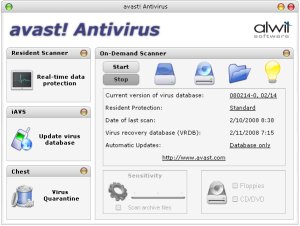
Avast is the best antivirus in terms of resource consumption. It has a low CPU and memory footprint, even while scanning. Several independent tests have found out that Avast is comparable to Norton Antivirus, Kaspersky etc. in terms of scanning accuracy, quicker than every other antivirus, and has the smallest online updates among them. Virus definition updates often go unnoticed, and we are alerted only when the update is complete.
There are several skins available for Avast. My personal favorite is the Mac OS X theme that mimics the Mac interface well, but there is a Vista theme also.
2. Spybot S&D: Free for private use.
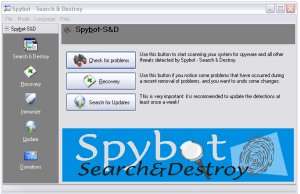
Spybot S&D is one of the best anti-spyware tools available. Working in tandem with Ad-Aware SE, these two tools can sweep out most malware. The interface is simple, and presents three large buttons: Check for problems, Recovery and Search for Updates. Self-descriptive commands and options are the hallmark of Spybot S&D. There are two modes, Default and Advanced. Advanced mode adds many new options, but one wrong step and you may make or break the computer. The program will warn this when you try to switch to Advanced mode, though.
3. Foxit PDF: Free for personal use, contains an upgrade option for PDF editing and advanced usage.
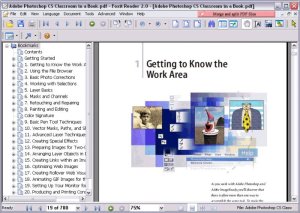
Adobe Reader takes several seconds to load up. However, a free, lightweight alternative called Foxit is available. Foxit can be used as a basic reader for free, but advanced features like editing require a paid upgrade. It is the ‘light-weight’ factor that makes Foxit so attractive. Foxit also includes nifty features like minimizing to tray to reduce clutter on the taskbar.
4. ImgBurn: Currently at version 2.4, and free for personal use.
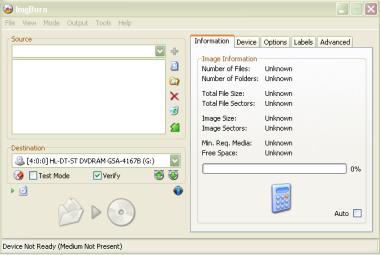
ImgBurn is a lightweight disc burning program, with a focus on getting things done quickly. Too many options may come in your way in Nero, but ImgBurn makes disc burning look easy. When starting up, you are met with a startup screen with options like ‘Write image file to disc’, ‘Write files to disc’ etc. Clicking one of those large icons takes you to the appropriate window.
5. FeedReader/FeedDemon: Free.
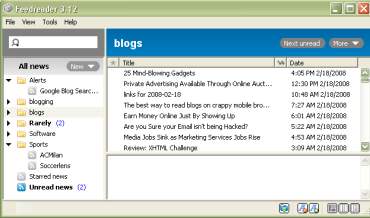
Feed reading can be made fun and enjoyable by using a desktop feed reader. While these do not have features like ‘Shared Items’ in Google, they are quick and easy to use. You can read feeds much like reading emails in a desktop app. There are options to bookmark favorite posts for further reference, and there is a separate folder for these bookmarked posts. FeedDemon has another useful feature - synchronization with Newsgator online account. This can be particularly useful if you move between several computers regularly, and want to stay synchronized.
6. VLC player: Free and open-source.

VLC player is best known as a play-it-all media player. The open-source VLC player can play videos with ease. The interface design is rather drab, but not difficult to use. Weighing in at a hefty 35 MB, VLC might look heavy. However, this extra megabytes is caused by the codecs that are bundled. So, you can play most formats without installing any codecs on the PC.
VLC is one of the few players that can play FLV and mobile video files without conversion.
7. Digsby/Pidgin: Free (Digsby) and open-source (Pidgin).

Multi-protocol instant messenger clients are always desirable for those who chat often, or need to connect with users of different protocols. Digsby was launched recently and is invite-only (get invite codes here and here), while Pidgin is free and open-source. Pidgin has a large number of plugins and themes available, while Digsby is feature-rich by default. Digsby has inline email reply(within the client) and integration with Facebook and MySpace - two innovative features. If you’re tired of Pidgin’s drab interface, try Digsby - it has a pleasant-looking interface.
8. IZArc: Free.
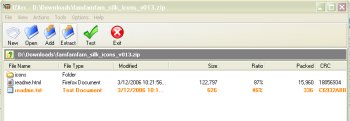
IZArc is a powerful archive/unarchive utility. It is free and lightweight. It has all the features of other archival utilities, plus some extra features like unpacking .iso files to component files. This can be particularly useful when you get a disc and need to extract and install any single part of the software, say the .net framework (I have used it for that particular purpose).
Got anymore free stuff which everyone can use....please share them in your comments..!!!
Subscribe to:
Posts (Atom)
