Showing posts with label Google. Show all posts
Saturday, November 27, 2010

Backup Google Calendar In ICS Format With Google Calendar Backup Utility

Google Calendar Backup Utility is a new freeware that lets you create backup of Google Calendar in ICS format for offline access. Even though Google Calendar can be exported in ICS format manually from Settings, this application offers a minimalistic interface for creating automatic backups at defined intervals.

First off, it requires you to specify the URL address of the Google Calendar along with backup directory and calendar name. On the main screen, click Add button, enter details and click OK to start populating the list. If you’ve been managing multiple calendars, you can follow the same procedure to backup multiple Google Calendars at once.

add gc

Once all the calendars are listed, backup process can be scheduled at defined intervals, enter number of hours/minutes/days after which a backup is to be created. Once done, you can either click Backup Now to create first backup or minimize the application to taskbar to let it backup calendar items after specified interval.

GC backup1

If you are an active Google Calendar user, you will probably find this backup application useful. It runs on Windows XP/Vista/7, while our testing was done on Windows 7 x86 system.

Download Google Calendar Backup Utility

Posted by Deepak at 1:48 PM | 0 comments  
Labels:
Wednesday, January 13, 2010

Upload Any File Type In Google Docs


Google users will soon be able to upload any file type to Docs (as long as it’s under 250MB) — as opposed to the very limited slate of document types currently supported (like images, Word docs, PDFs, spreadsheets and PowerPoint presentations).

Tech news blog TechCrunch quotes Google Docs product manager Vijay Bangaru emphasising that this is not the much speculated GDrive, but they appropriately point out that — regardless of what they’re calling it — it sure sounds like the GDrive people were expecting. Users will get 1GB of free storage to hold whatever they want, and they can buy more storage space for $US0.25 per GB.

Upload your files and access them anywhere with Google Docs [Official Google Blog]


Posted by Deepak at 9:35 AM | 0 comments  
Labels:
Tuesday, September 15, 2009

Google’s Data Liberation Front Details How To Free Your Data From Google


Google’s new Data Liberation Front is designed to help you liberate your data from any Google service with as little pain as possible so you’re not locked into Gmail, for example, just because all your old email is there.

It’s easy to fall in love with a great service and completely forget about the importance of controlling your own data. Data Liberation Front aims to keep data free so you can use any service you want—ideally because you like it, not because you feel trapped there. From the Google Public Policy blog:

Imagine you want to move out of your apartment. When you ask your landlord about the terms of your previous lease, he says that you are free to leave at any time; however, you cannot take all of your things with you – not your photos, your keepsakes, or your clothing. If you’re like most people, a restriction like this may cause you to rethink moving altogether. Not only is this a bad situation for you as the tenant, but it’s also detrimental to the housing industry as a whole, which no longer has incentive to build better apartments at all.

Although this may seem like a strange analogy, this pretty accurately describes the situation my team, Google’s Data Liberation Front, is working hard to combat from an engineering perspective. We’re a small team of Google Chicago engineers (named after a Monty Python skit about the Judean People’s Front) that aims to make it easy for our users to transfer their personal data in and out of Google’s services by building simple import and export functions. Our goal is to “liberate” data so that consumers and businesses using Google products always have a choice when it comes to the technology they use.

Right now the site demonstrates the easiest way to liberate your data from Google services ranging from Blogger and Calendar to Gmail, Reader, and YouTube. The site isn’t just about how to escape from Google services, though. It also details how to bring your data to Google apps from other web services.

Even though most people don’t give it all that much thought, data lock-in is a serious problem—it’s why we rounded up several free tools to back up your online accounts just last month. Google’s apps aren’t perfect, but hopefully this initiative will improve their data export capabilities as well as set a nice example for other companies.

Data Liberation Front [via Google Public Policy Blog]

From LH


Posted by Deepak at 9:03 AM | 0 comments  
Labels:
Wednesday, July 8, 2009

Google Chrome OS announced: Google takes on OS world

Announcing the existence of the Google Chrome OS today, Sundar Pichai, Google’s vice president of product management and Linus Upson, Google’s engineering director said it would be “our attempt to re-think what operating systems should be.”

Promising the Chrome OS will be open source, lightweight and speedy, Google also pledges that Chrome OS will “start up and get you onto the web in a few seconds.”

A Google operating system has been one of the web’s most consistent rumours for years, but today Google announced it is real: Google Chrome OS will be launched next year, going head to head with Windows.

As quoted in their blog,


It's been an exciting nine months since we launched the Google Chrome browser. Already, over 30 million people use it regularly. We designed Google Chrome for people who live on the web — searching for information, checking email, catching up on the news, shopping or just staying in touch with friends. However, the operating systems that browsers run on were designed in an era where there was no web. So today, we're announcing a new project that's a natural extension of Google Chrome — the Google Chrome Operating System. It's our attempt to re-think what operating systems should be.

Google Chrome OS is an open source, lightweight operating system that will initially be targeted at netbooks. Later this year we will open-source its code, and netbooks running Google Chrome OS will be available for consumers in the second half of 2010. Because we're already talking to partners about the project, and we'll soon be working with the open source community, we wanted to share our vision now so everyone understands what we are trying to achieve.

Speed, simplicity and security are the key aspects of Google Chrome OS. We're designing the OS to be fast and lightweight, to start up and get you onto the web in a few seconds. "


Posted by Deepak at 11:38 AM | 0 comments  
Labels:
Wednesday, April 15, 2009

6 Tips to Help You Get the Most Out of Google Docs

There are many services out on the web for online collaboration, but there’s no doubt that Google Docs is rapidly becoming one of the more popular brands. Google Docs is free, web based (i.e. cross platform), and quite simple to use. But that doesn’t mean it lacks features.

Whether you’re a regular user or have just been thinking about trying it out, here are the top 6 tips and tricks to help you get the most out of Google Docs.

1. Chatting in Google Docs
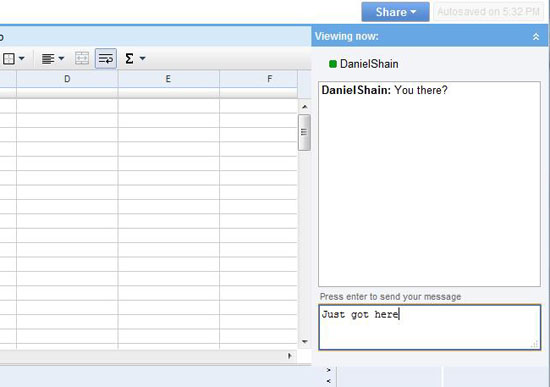
Chatting.

To get the most out of Google Docs, you’ve got to be able to communicate in real time and with more efficiency than simply writing notes to each other on the shared page. Google Docs takes care of this issue with a built in chat client that hides easily in the top right corner.
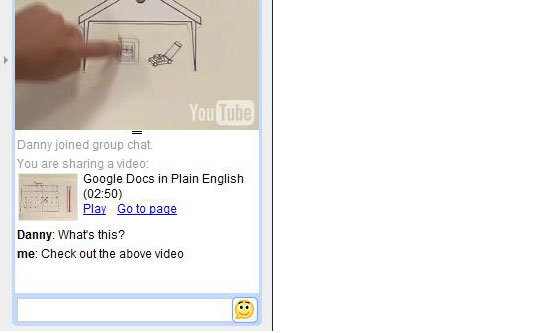
Chatting in Google Docs.

When sharing a presentation, the chat client has the ability to share inline photos from Picasa or Flickr and videos from Google video and YouTube.

2. Organize your documents easily.
Colors

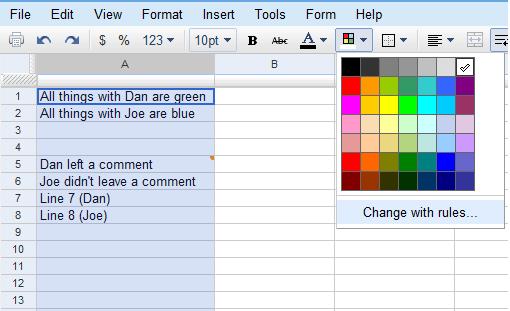
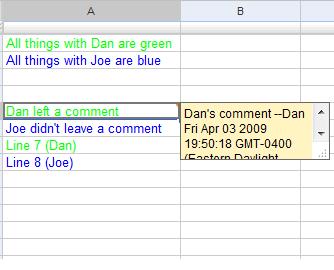
Google Docs uses a pretty clean interface, but any time you’re sharing with multiple people it pays to be as organized as possible. With Google Docs the best way to stay organized is by making use of colors and comments.
Comments

In a spreadsheet colors can be set to follow certain rules (such as turning the text of every cell with your name in it purple), and you can insert comments by right clicking on any cell to get your message across without taking up space.
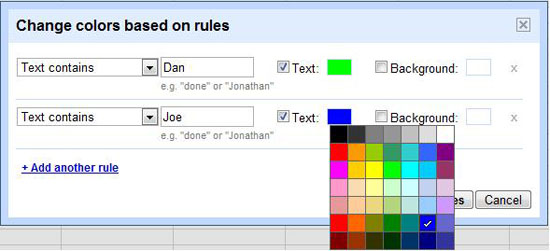
Colors in Google Docs.

In the overall Docs interface, folders can be color coded too in a manner similar to gmail labels.

3. Share with others
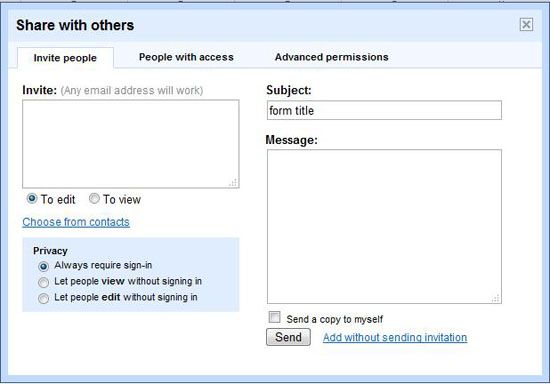
Sharing documents on Google Docs.

Google Docs is all about sharing, but you knew that. The key, however, is to know exactly how you can share. At the discretion of the owner, collaborators can be invited to edit or simply to view a shared document.

Sharing on Google Docs.

By default anyone who can edit the document has the ability to share the document with others, and if you really want to open the floodgates you can open the document for universal viewing or editing. Be warned though, there is a limit of 10 people for simultaneous editing of documents and presentations (for spreadsheets, the limit is a much safer 50).

4. Scale back (revision)
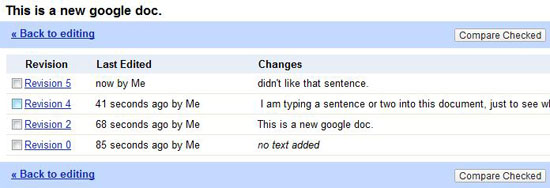
Make Revisions.

You already know Google Docs is autosaving everything you do, but you may not know that you can manipulate past revisions in order to see exactly what’s changed.
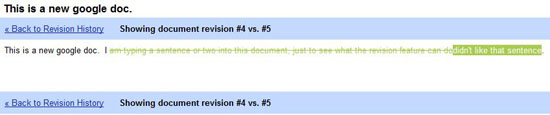
Revisions.

All Google Docs will keep a revisions history so you can track your changes and, if you want, revert to them at any time. In the document revision history, you even have the ability to look at two versions side by side to view color coded changes.

5. Draw
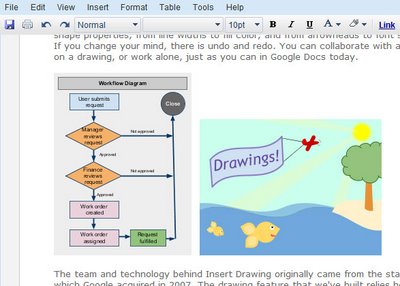
Drawing.

Just recently Google added a collaborative drawing feature to Google Docs. This opens up a whole new array of sharing options, as diagrams and charts can now be constructed and shared with ease. The options are obviously not comprehensive, but you have your choice of a variety of shapes, lines, arrows, or text boxes, and you can color and rotate and even layer the objects to a certain extent. The picture for this one is Google’s.

6. The rest

There are a number of other features located within Google Docs that you may or may not find useful.
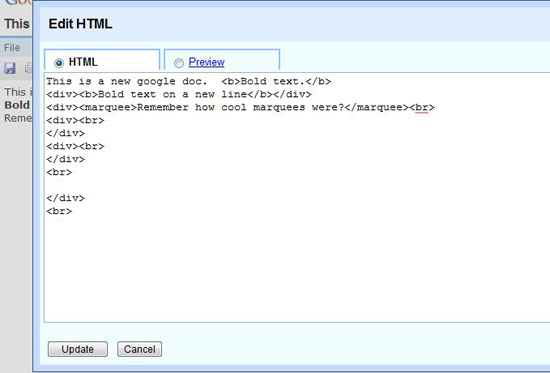
HTML.

Google gives you the ability to edit the html or even the css of your documents. In a spreadsheet, you can reference one sheet from the other, allowing users to stay on their own sheet while simultaneously updating others. There is also Google’s live lookup which can be used to have cells contain data gathered live from the internet, and much more. And yes, that html will put a marquee on your google doc.

Google Docs is currently in Beta and frequently changes. Google provides their own tutorial here and blogs about many of the changes they make here.

What’s your favorite Google Doc tip?

Posted by Deepak at 1:59 PM | 0 comments  
Labels:
Tuesday, April 15, 2008

7 Google Search Tips and Facts


If you use Google (and who doesn’t? Oh! well maybe these people don’t), here are a few simple, interesting and useful Google search tips and facts you may have forgotten all about:

1. The asterisk is a search wildcard. For example, searching for three*mice finds three blind mice, three button mice, etc.

2. Google search currently has a hard limit of 32 words - that’s keywords and special syntax combined. Search terms after the first 32 words are ignored.

3. Google’s Boolean default is AND, which means that, if you enter query words without modifiers, Google will search for all of your query words.

4. The Google synonym operator, the ~ (tilde) character, placed in front of any number of keywords in your query, asks Google to include not only exact matches, but also what it thinks are synonyms for each of the keywords. For example, search for ~legal, you will get results for lawyer, attorney, law, etc.

5. Google is case insensitive. If you search for Three, three, THREE, even ThrEE, you get the same results.

6. Numrange searches for results containing numbers in a given range. Just add two numbers, separated by two periods, with no spaces, into the search box along with your search terms. For example, If you’re looking to spend $800 to $1,000 on a nice 3 to 6 megapixel digital SLR camera, Google for: slr digital camera 3..6 megapixel $800..1000.

7. Page size in Google results is never going to be more than 101 KB. That’s because Google doesn’t index more than 101 KB worth of a given web page.


Posted by Deepak at 8:52 AM | 2 comments  
Labels: ,
Subscribe to: Posts (Atom)
Blog Widget by LinkWithin